Table of Contents
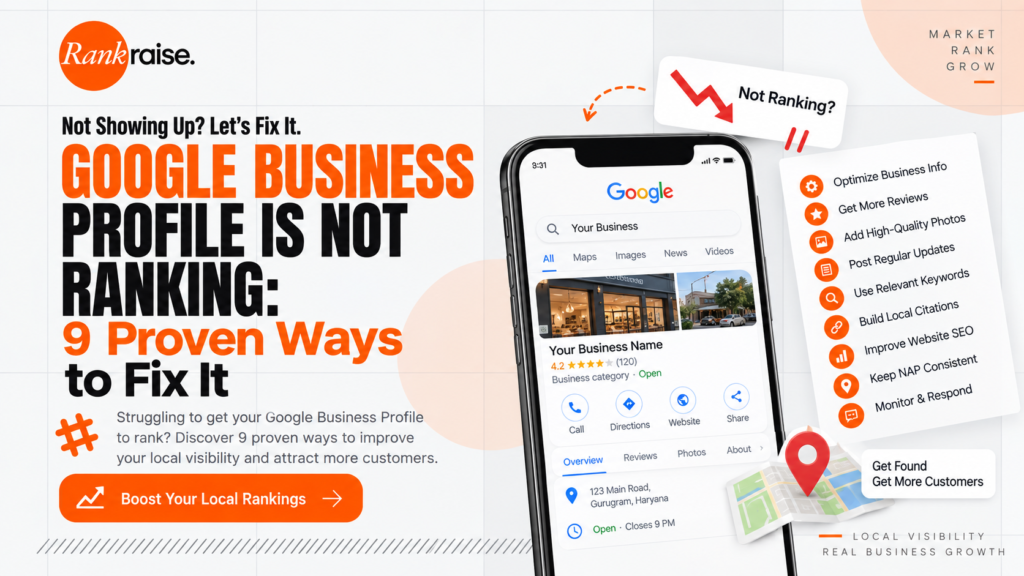
Google Business Profile Is Not Ranking is a frustrating problem for local businesses that depend on Google Maps, local search, calls, website visits, and direction requests to generate customers. You may have created your profile, verified your business, added photos, written a description, and collected a few reviews, yet your business still does not appear when potential customers search for your services.
So, why is your Google Business Profile not ranking?
The problem is usually not one missing setting. Google says local results are primarily influenced by relevance, distance, and prominence. Your profile needs to accurately represent your business, match what people are searching for, and build enough local prominence to compete with other businesses.
The good news is that many local SEO problems can be identified and improved.
In this guide, we will explain why your Google Business Profile is not ranking, what mistakes may be holding it back, and what you can do to improve your local visibility.
Why Is Your Google Business Profile Not Ranking?
If your Google Business Profile Is Not Ranking, start by looking at the fundamentals instead of immediately chasing complicated SEO tricks.
Google evaluates local businesses using relevance, distance, and prominence. Relevance determines how closely your profile matches a customer’s search. Distance considers how far the business is from the person searching. Prominence relates to how well known and established the business appears to be.
You cannot completely control all three.
For example, you cannot simply move your physical business closer to every potential customer.
However, you can improve the signals you control.
Here are the most common reasons your profile may not be performing well.
1. Your Primary Business Category Is Wrong
One of the first things to check when your Google Business Profile Is Not Ranking is your primary category.
Your primary category tells Google what your business fundamentally does.
For example, a dental clinic should choose the most accurate dental category rather than selecting a broad category simply because it contains a popular keyword.
The same applies to restaurants, pharmacies, marketing agencies, salons, diagnostic centres, gyms, hotels, and other local businesses.
Google recommends choosing categories that accurately represent your core business and using as few categories as necessary to describe what you actually offer.
Do not turn the category section into a keyword stuffing exercise.
Choose the most accurate primary category first, then add relevant secondary categories where appropriate.
2. Your Business Information Is Incomplete
Another reason Google Business Profile Is Not Ranking could be incomplete or inaccurate information.
Your profile should clearly communicate:
Business name
Address
Phone number
Opening hours
Website
Primary category
Services
Business attributes where relevant
Google specifically recommends keeping Business Profile information complete and accurate because this helps Google understand what your business does and whether it is relevant to local searches.
Check every important field rather than assuming your profile is already optimized.
Even something as simple as outdated opening hours can create a poor customer experience.
Make sure your holiday and special hours are updated when necessary.
3. Your Business Name Contains Unnecessary Keywords
This is a common mistake.
A business might be called:
Rank Raise
But someone may change the Google Business Profile name to:
Rank Raise Best SEO Agency in Delhi NCR
because they believe the extra keywords will improve rankings.
That is not a smart strategy.
Google’s guidelines state that a business name should represent the real world name of the business. Adding unnecessary information such as keywords, services, locations, or promotional language can violate the guidelines and may create problems with the profile.
So if your Google Business Profile Is Not Ranking, do not respond by stuffing keywords into the business name.
That could create a bigger problem instead of solving the original one.
4. Your Profile Does Not Have Enough Local Prominence
Relevance gets your business into the conversation.
Prominence helps determine how strongly your business competes.
Google explains that prominence can be influenced by information such as links from other websites and reviews. More reviews and positive ratings can help a business’s local ranking.
This means your Google Business Profile should not exist in isolation.
Your website, reviews, local mentions, business directories, industry websites, and other online references can contribute to your overall local presence.
This is where a broader SEO strategy becomes useful.
Instead of treating Google Maps as a completely separate marketing channel, build your website and local presence together.
5. Your Reviews Are Weak or Inconsistent
Reviews are important for both visibility and customer trust.
If your competitors have hundreds of genuine reviews while your business has only a handful, you may have a difficult time competing for attention.
However, do not buy fake reviews.
Do not create fake accounts.
Do not offer misleading incentives for reviews.
Instead, build a legitimate review generation process.
Ask genuine customers to leave honest feedback after they have actually used your products or services.
You should also respond to reviews professionally.
Google recommends responding to reviews because it shows customers that you value their feedback.
A good review strategy is not simply about collecting five star ratings.
It is about consistently building genuine customer feedback.
6. Your Website Does Not Support Your Local SEO Strategy
Here is a mistake many businesses make.
They optimize their Google Business Profile but completely ignore their website.
If your business is trying to rank for local searches, your website should clearly communicate:
What your business does
Where you operate
Which services you provide
Who you serve
How customers can contact you
For example, a digital marketing agency targeting Delhi NCR may need dedicated pages explaining its services and relevant locations instead of relying on one generic homepage.
Your website should also be technically sound, mobile friendly, useful, and easy for search engines to understand.
Google’s SEO Starter Guide provides useful guidance on creating search friendly websites and content.
If your Google Business Profile Is Not Ranking, look beyond the profile itself and evaluate the website connected to it.
7. Your Local Business Information Is Inconsistent
Another possible problem is inconsistent business information across the web.
Check whether your:
Business name
Address
Phone number
Website
are consistent across your website, business directories, social profiles, industry listings, and other important platforms.
For example, if your Google profile says:
Rank Raise
but another important directory lists:
RankRaise Digital Marketing Pvt Ltd
and another uses a different phone number or address, that creates unnecessary inconsistency.
This does not mean every tiny punctuation difference automatically destroys rankings. SEO is rarely that dramatic.
But maintaining accurate business information across important sources helps establish a clearer digital identity.
8. Your Profile Has Weak Visual Content
Photos are not simply decoration.
They help customers understand your business before they decide whether to contact or visit you.
Depending on your business, consider adding genuine photographs of:
Your storefront
Office
Team
Products
Services
Facilities
Work environment
Equipment
Completed projects
Do not fill your profile with random stock images.
Real business photographs are more useful to potential customers and provide stronger representation of the business.
Google also recommends adding photos and videos to Business Profiles to show customers what the business offers.
If your Google Business Profile Is Not Ranking, visual optimization should not be your only strategy, but it is still worth addressing.
9. Your Profile May Have a Verification or Policy Problem
Sometimes the issue is more fundamental.
Your profile may not be properly verified, or it may have a policy issue that affects its visibility.
Google states that verification helps confirm that you are authorized to represent the business.
Google also has detailed guidelines governing how businesses can represent themselves on the platform. Violations can result in restrictions or suspension.
Check whether:
Your profile is verified
Your business is eligible
Your information accurately represents the real business
You have accidentally created duplicate profiles
Your address is legitimate
Your business name follows Google’s guidelines
You are using accurate categories
Your profile has any warnings or restrictions
If your Google Business Profile Is Not Ranking because of a verification or policy issue, adding more posts or photos will not solve the underlying problem.
Fix the eligibility or policy problem first.
How to Fix a Google Business Profile That Is Not Ranking
Now that you know the common problems, let’s turn them into an actionable process.
Step 1: Audit Your Primary Category
Review your primary category and compare it with your actual business.
Do not choose a category because it has the highest sounding keyword.
Choose the category that most accurately represents your core business.
Then review relevant secondary categories.
Step 2: Complete Every Important Profile Field
Check your:
Business information
Opening hours
Phone number
Website
Services
Categories
Attributes
Business description
Photos
Make sure everything is accurate.
Step 3: Improve Your Review Process
Create a simple system for requesting genuine customer reviews.
After completing a service, provide customers with an easy way to find your review page.
Respond to reviews consistently and professionally.
Do not purchase reviews.
A thousand fake reviews are not a local SEO strategy.
They are a future headache.
Step 4: Improve Your Website
Your website should support the same local intent as your Business Profile.
Create useful service pages.
Create location pages when they genuinely serve different audiences.
Add clear contact information.
Make your website mobile friendly.
Improve page speed.
Strengthen internal linking.
Publish useful local content.
If you are also working on broader digital marketing, you can explore Rank Raise for SEO and digital marketing services.
Step 5: Build Local Authority
Look for legitimate opportunities to earn mentions and links from relevant websites.
Potential sources include:
Local news websites
Industry associations
Local directories
Business organizations
Community websites
Relevant publications
Partner businesses
Sponsorship pages
The goal is not to collect hundreds of meaningless links.
The goal is to build a stronger and more credible local presence.
Do Google Business Profile Posts Make You Rank Higher?
Do not treat posts as a magic ranking button.
Publishing useful updates can help customers discover information about your business and may support engagement, but Google’s published explanation of local ranking centers on relevance, distance, and prominence rather than promising that simply publishing a certain number of posts will make a profile rank higher.
Use posts because they are useful to customers, not because you believe posting ten times will unlock some imaginary Google ranking lever.
That distinction matters.
How Long Does It Take for a Google Business Profile to Rank?
There is no guaranteed timeframe.
If your Google Business Profile Is Not Ranking, the time required to improve visibility depends on your location, competition, category, existing authority, profile quality, reviews, website strength, and other local signals.
Distance also matters.
A business cannot realistically expect to rank equally well for every search across an entire city.
Google explicitly states that distance is one of the main factors in local results.
So if your business is physically located in one part of a city, your visibility may differ significantly depending on where the searcher is located.
That is normal local search behavior.
What Not to Do When Your Google Business Profile Is Not Ranking
When Google Business Profile Is Not Ranking, avoid shortcuts that can create bigger problems.
Do not stuff keywords into your business name.
Do not create fake locations.
Do not create duplicate profiles.
Do not buy fake reviews.
Do not use a virtual office that does not meet Google’s requirements.
Do not create fake local citations.
Do not spam irrelevant business categories.
Do not create location pages with no useful content.
Google’s Business Profile guidelines specifically require businesses to accurately represent themselves and provide accurate address and service area information.
Shortcuts might look clever for five minutes.
Then Google catches up.
Final Thoughts
If your Google Business Profile Is Not Ranking, do not immediately assume that Google is ignoring your business.
Start with the fundamentals.
Check your category.
Verify your information.
Complete your profile.
Build genuine reviews.
Improve your website.
Strengthen local authority.
Add useful photos.
Follow Google’s guidelines.
Most importantly, understand that local SEO is not controlled by one checkbox.
Google evaluates local businesses using relevance, distance, and prominence.
You cannot control everything, especially distance.
But you can improve the quality and consistency of the signals that you do control.
The goal should not simply be to make your profile look “optimized.”
The goal is to make your business the most relevant, trustworthy, and useful option for the local customer searching for what you provide.
That is a much better SEO strategy than stuffing your profile with keywords and hoping Google gets impressed.
Frequently Asked Questions
Why is my Google Business Profile not ranking?
Your Google Business Profile may not be ranking because of weak relevance, incorrect categories, incomplete information, limited prominence, insufficient genuine reviews, weak website support, inconsistent business information, or verification and policy problems.
How do I improve my Google Business Profile ranking?
Start by choosing the correct primary category, completing your business information, maintaining accurate hours, collecting genuine customer reviews, responding to reviews, adding relevant photos, improving your website, and building legitimate local authority.
Does adding keywords to my Google Business Profile name improve rankings?
No. Your business name should represent your real world business name. Adding unnecessary keywords to the name can violate Google’s Business Profile guidelines and may create problems with your profile.
Do Google reviews help local rankings?
Google states that prominence is one factor in local ranking and notes that reviews and positive ratings can help a business’s local ranking.
Can I pay Google to rank my Business Profile higher?
Google states that there is no way to request or pay for a better local ranking.
Why does my competitor rank above me on Google Maps?
Your competitor may have stronger relevance, greater prominence, more established local signals, stronger reviews, or simply be closer to the person searching. Local ranking depends on multiple factors rather than one universal ranking score.